Operating the KEDA autoscaler for vLLM serving (see GPU signals and autoscaling). Covers the paused-by-default posture, the GPU-tier load-test demo, and the free CPU-sim path that proves 1→N scale-out.

Model

  • KEDA operator (platform/keda, ns keda, auto-sync): controller only, no cost.
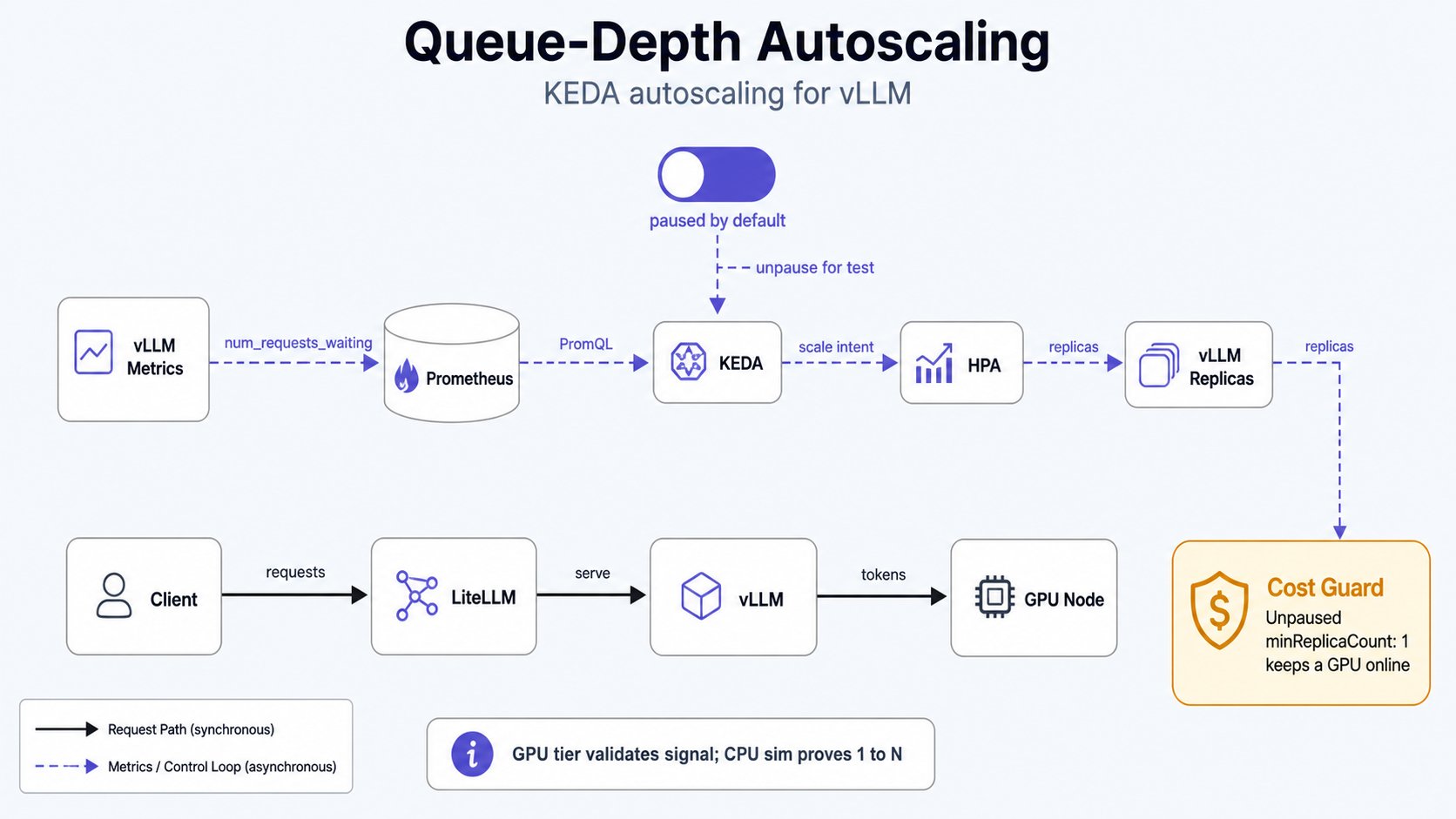
  • ScaledObject raw-vllm (serving/raw-vllm/scaledobject.yaml, ns serving) scales the vLLM Deployment on sum(vllm:num_requests_waiting) (threshold ~5/replica) + a KV-cache secondary. Ships paused. While paused KEDA touches no replicas, so make vllm-up/down and $0-idle are unaffected. Un-pause only for a deliberate load test, then re-pause.
A live ScaledObject owns /spec/replicas. An unpaused minReplicaCount: 1 keeps a GPU node up 24/7 (~$240/mo) and overrides make vllm-down: that is why it is paused by default. Never leave it un-paused on the GPU tier. Queue-depth autoscaling model showing vLLM metrics, Prometheus, KEDA, HPA, replicas, and the paused-by-default cost guard
1. Toggle the autoscaler

make keda-demo-up    # un-pause the ScaledObject (KEDA starts driving replicas)
make keda-demo-down  # re-pause (KEDA stops; return to manual make vllm-up/down)
These flip the autoscaling.keda.sh/paused annotation live. The app is manual-sync, so selfHeal will not revert the toggle; a manual argocd sync reapplies the committed default (paused: true), the safe state, so that is fine.

2. GPU-tier load test (validates the trigger; single-GPU caps scale-out at 1)

GPUS_ALL_REGIONS=1 caps the GPU pool at one node, so real raw-vllm cannot exceed 1 replica. Use this to confirm KEDA reads the metric and computes scale intent; prove 1→N on the sim (§3).
# Restore the cluster first: needs a live GPU + Prometheus.
make vllm-up                 # 1 warm replica
make keda-demo-up            # un-pause autoscaling

kubectl -n serving get scaledobject raw-vllm                 # READY=True, ACTIVE flips on load
kubectl -n serving get hpa keda-hpa-raw-vllm -w              # KEDA-generated HPA; watch TARGETS

# Drive queue depth (concurrent requests > what 1 replica drains):
make bench                   # or: hey/vegeta against the gateway with high concurrency

# Observe: vllm:num_requests_waiting climbs → HPA desired rises (capped at 1 here by quota).
kubectl -n serving describe scaledobject raw-vllm | sed -n '/Triggers/,$p'

make keda-demo-down          # re-pause
make vllm-down               # release the GPU node ($0 idle)
If the HPA shows <unknown> for TARGETS, KEDA cannot read the metric; see §4.

3. Free CPU-sim scale-out proof (1→N, $0 GPU)

The llm-d-inference-sim backends (ns inference, no GPU) emit the same vllm:num_requests_waiting. Scrape them into Prometheus and point a throwaway ScaledObject at them to demonstrate genuine 1→N without GPU cost. These are validation aids: apply on demand, delete after (not committed manifests).
# Sim backends must be running:
kubectl -n inference scale deploy/vllm-sim --replicas=1

# Land sim metrics in cluster Prometheus:
kubectl -n inference apply -f - <<'EOF'
apiVersion: monitoring.coreos.com/v1
kind: ServiceMonitor
metadata:
  name: vllm-sim
  namespace: inference
spec:
  selector:
    matchLabels:
      app: vllm-sim
  endpoints:
    - port: http
      path: /metrics
      interval: 15s
EOF
# (requires a Service selecting app=vllm-sim on port `http`; add one if the demo lacks it.)

# Autoscale the sim on queue depth:
kubectl apply -f - <<'EOF'
apiVersion: keda.sh/v1alpha1
kind: ScaledObject
metadata:
  name: vllm-sim
  namespace: inference
spec:
  scaleTargetRef:
    name: vllm-sim
  pollingInterval: 15
  cooldownPeriod: 60
  minReplicaCount: 1
  maxReplicaCount: 5
  triggers:
    - type: prometheus
      metadata:
        serverAddress: http://prometheus-operated.monitoring.svc:9090
        metricName: vllm_num_requests_waiting
        query: sum(vllm:num_requests_waiting{namespace="inference"})
        threshold: "5"
EOF

# Drive load through the gateway, watch the sim scale 1→N→min:
kubectl -n inference get hpa keda-hpa-vllm-sim -w

# Cleanup:
kubectl -n inference delete scaledobject vllm-sim
kubectl -n inference delete servicemonitor vllm-sim

4. Troubleshooting

HPA TARGETS <unknown> / ScaledObject READY=False. KEDA can’t reach Prometheus or the query returns no series.
  • Confirm the Prometheus service name: kubectl -n monitoring get svc | grep prometheus. The ScaledObject points at prometheus-operated.monitoring.svc:9090 (the operator’s stable headless service). If your kube-prometheus-stack release exposes a different service, update serverAddress.
  • Confirm the metric exists and the name is right (vLLM V1 renamed several series): kubectl -n serving port-forward deploy/raw-vllm 8000 & curl -s localhost:8000/metrics | grep -E 'num_requests_waiting|cache_usage'. Expect vllm:num_requests_waiting and vllm:kv_cache_usage_perc (NOT gpu_cache_usage_perc). Fix the query in scaledobject.yaml if a name differs.
ScaledObject never scales in. cooldownPeriod is 300s (5 min) by design to avoid flapping on a slow-cold-start workload; wait it out. It won’t stop bringing the GPU up. You left it un-paused. make keda-demo-down then make vllm-down. The committed default is paused. See also: vllm-serving.md (the replicas/ignoreDifferences interaction), staged-bring-up.md.