

GPU stack reminder. On GKE the driver, device plugin, and DCGM are already present. Off GKE,
make sure the NVIDIA GPU Operator is installed before you bring serving up, or GPU pods will
stay Pending.
Point this repo at your cluster
This repo talks only to its own kubeconfig file (./kubeconfig, gitignored), never your global
~/.kube/config or current context. The isolation is deliberate: a context switch or a kubeconfig
overwrite in another terminal cannot silently redirect a deploy. Every cluster command prints the
resolved target and refuses to run if the file is missing or the cluster is unreachable. Override the
path with CLUSTER_KUBECONFIG=/some/path if you keep it elsewhere.
Generate it once, pointed at the cluster you provisioned:
-
GKE: the
get-credentialscommand for your fork comes from Terraform output. Write it to the dedicated file: -
Hetzner / bring your own cluster: copy your kubeconfig into place (or point
CLUSTER_KUBECONFIGat it):
make targets resolve ./kubeconfig for you. For the manual kubectl commands in this guide,
point your shell at the same file so they reach this cluster and not your global context:
Confirm secrets are seeded
The platform never stores secret values in git. External Secrets Operator (ESO) materializes Kubernetes Secrets from your secret backend; git holds only the contract (which secrets exist). You seeded the values in Provision withmake seed-secrets, so they
already exist; ESO syncs them as the platform comes up.
If you took the bring-your-own-cluster path and skipped that step, seed now: make seed-secrets
for a gcpsm backend, or create the keys in your own backend (the command prints the list). On a
non-gcpsm backend you also need the secret-store provider block filled in, which is a
Configure step (make seed-secrets writes values, it does not configure
the store). Until a value exists, its ExternalSecret stays SecretSyncError and the dependent pod
won’t start, by design.
The tutorial modelSee the secret contract guide for the full list and ownership, and the Secrets reference for the per-secret backend keys and the no-hosted-store path (the ESO Kubernetes provider, with a worked example).Qwen/Qwen2.5-0.5B-Instructis ungated, so no Hugging Face token is needed. Ahf-tokensecret is only required for the optional KServe demo with a gated model.
Bootstrap Argo CD
Argo CD is the GitOps entrypoint: install it once, then it reconciles everything from your fork:secrets/credentials.local.md:
Apply the app-of-apps
make root PROFILE=<p> applies the AppProject plus the per-layer ApplicationSets for that profile;
Argo CD then reconciles every app from your pushed fork (the ApplicationSets read
targetRevision: main, not your working tree). make wait PROFILE=<p> blocks until that profile’s
auto-sync apps report Synced + Healthy. Profiles are cumulative supersets, so a higher one includes
everything below it.
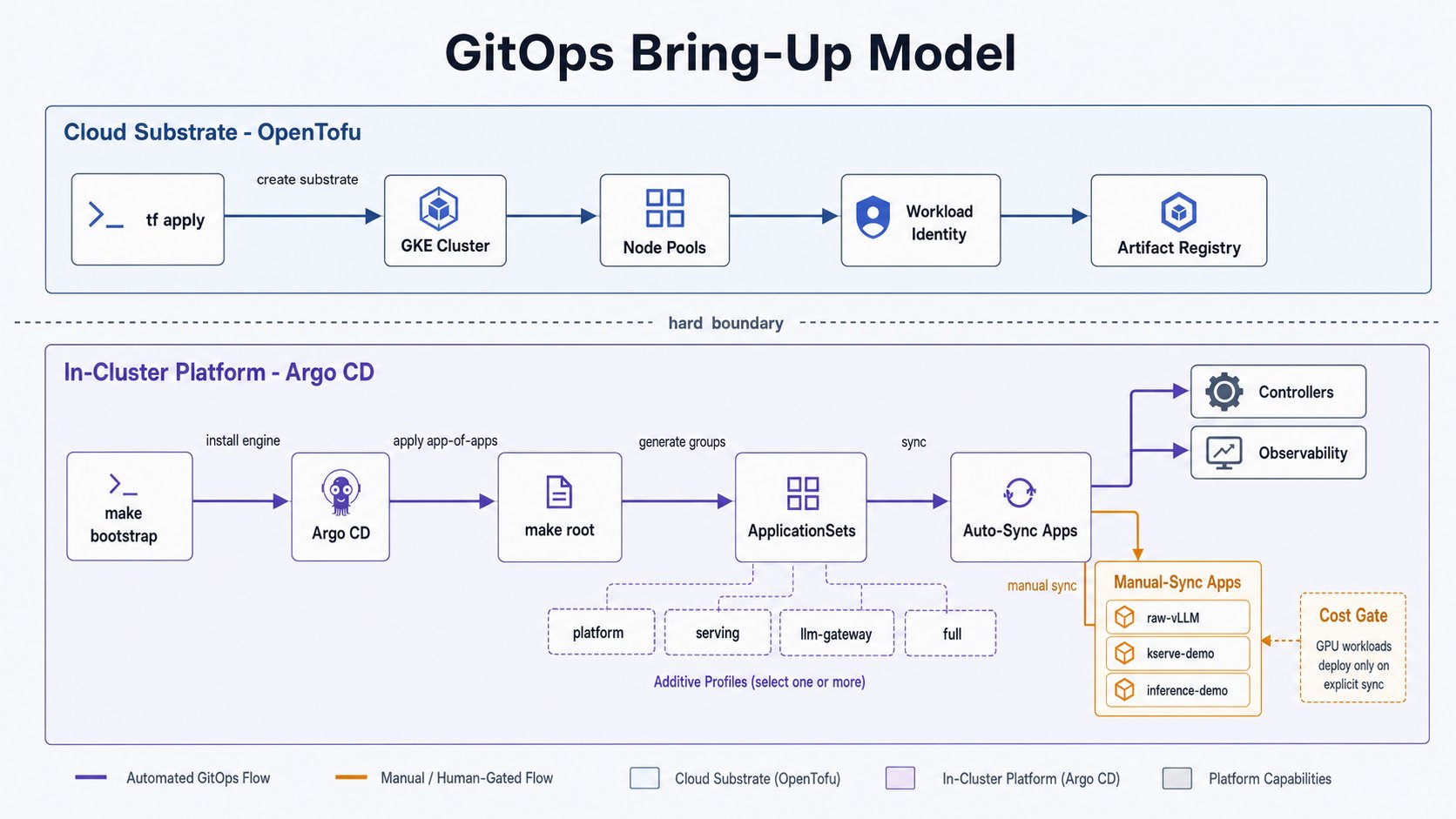
root and one wait at your target profile (the two must match). Paid workloads
stay dormant at any profile because they are manual-sync (see staged bring-up),
so full is safe:
make root refuses to run if groups.generated.yaml is missing. If you changed config.yaml since
make fork-init, re-run make resolve-groups, then commit and push before make root (Argo reads
git, not your working tree).
For a first bring-up, applying one layer at a time makes a broken layer obvious before you widen. Each
profile is a superset, so you re-run root at each step:
experience layer (Open WebUI, Tabby, key-portal, and n8n when enabled by feature flag) needs
deploy-time secrets that can live in neither git nor Secret Manager because they depend on the
running proxy: each app’s LiteLLM virtual key is minted against the live LiteLLM, so its traffic is
keyed and budgeted. Open WebUI also gets a random WEBUI_SECRET_KEY session signer. The in-cluster
litellm-keys Job mints these automatically once LiteLLM is reachable, so Open WebUI and Tabby
auto-sync with no manual step. n8n is a separate manual-sync app and uses its own key-minter Job. The
Jobs are idempotent: they keep a still-valid key and re-mint only when one is missing. To re-mint
Open WebUI’s secret by hand (for example after rotating the master key), run
make seed-experience.
Each ApplicationSet creates one app-of-apps per enabled capability group. To disable a group, flip
its bool in config.yaml and re-run make resolve-groups (the prune cascades). To remove a whole
layer, kubectl delete -f clusters/<env>/appsets/<layer>.yaml.
Per-profile validation:
Watch reconciliation in the UI:
admin.enabled: "false"), so fresh installs do not create
an initial admin password. After the identity and public-edge apps sync, sign in through Dex at
https://argocd.<your-domain>. Break-glass access is documented in
bootstrap/argo-cd/values.yaml.
Staged bring-up: the cost gate
The repo splits Argo apps by sync policy so a freshmake root never spins up paid compute:
platform/infra apps auto-sync; serving workloads are manual. Full detail in the
staged bring-up guide.
First confirm the platform is healthy and ESO actually synced your secret (the keyless secret chain
working).
SecretSyncError, run make doctor PROFILE=serving to find the missing secret value or
identity issue.
Then bring serving up. raw-vllm is a manual-sync app shipping at replicas: 0, so syncing
alone is still $0; make vllm-up is what provisions the GPU node:
make vllm-up waits on the rollout (up to 15m). First boot is slow: GPU node provisioning + model
pull + CUDA-graph capture. A warm node reuses the model-cache PVC. Optionally benchmark with
make bench (see Benchmarks).
What success looks like
make vllm-smoke ends with a non-empty completion:
- GitOps: Argo CD reconciling your fork (platform apps Healthy).
- Keyless secrets: ESO → your secret manager (
vllm-api-keySynced). - Authenticated serving: vLLM rejecting unauthenticated calls and answering authenticated
/v1/chat/completionswith HTTP 200.
Tear down: stop paying
The single most important command releases the GPU node and drops GPU spend to $0:Where to go next
- Staged bring-up guide: the day-to-day bring-up / cost gate.
- Serving layers compared: raw vLLM vs KServe.
- KServe guide: the optional managed-lifecycle serving path.