

- GKE: fully supported, the reference substrate.
- Hetzner: supported second cloud (self-managed GPU stack).
- Bring your own cluster: you already have a GPU cluster.
What the platform expects from any substrate
Whichever path you take, the platform assumes the substrate provides the same capabilities. On GKE most are managed; off GKE you provide or select them yourself.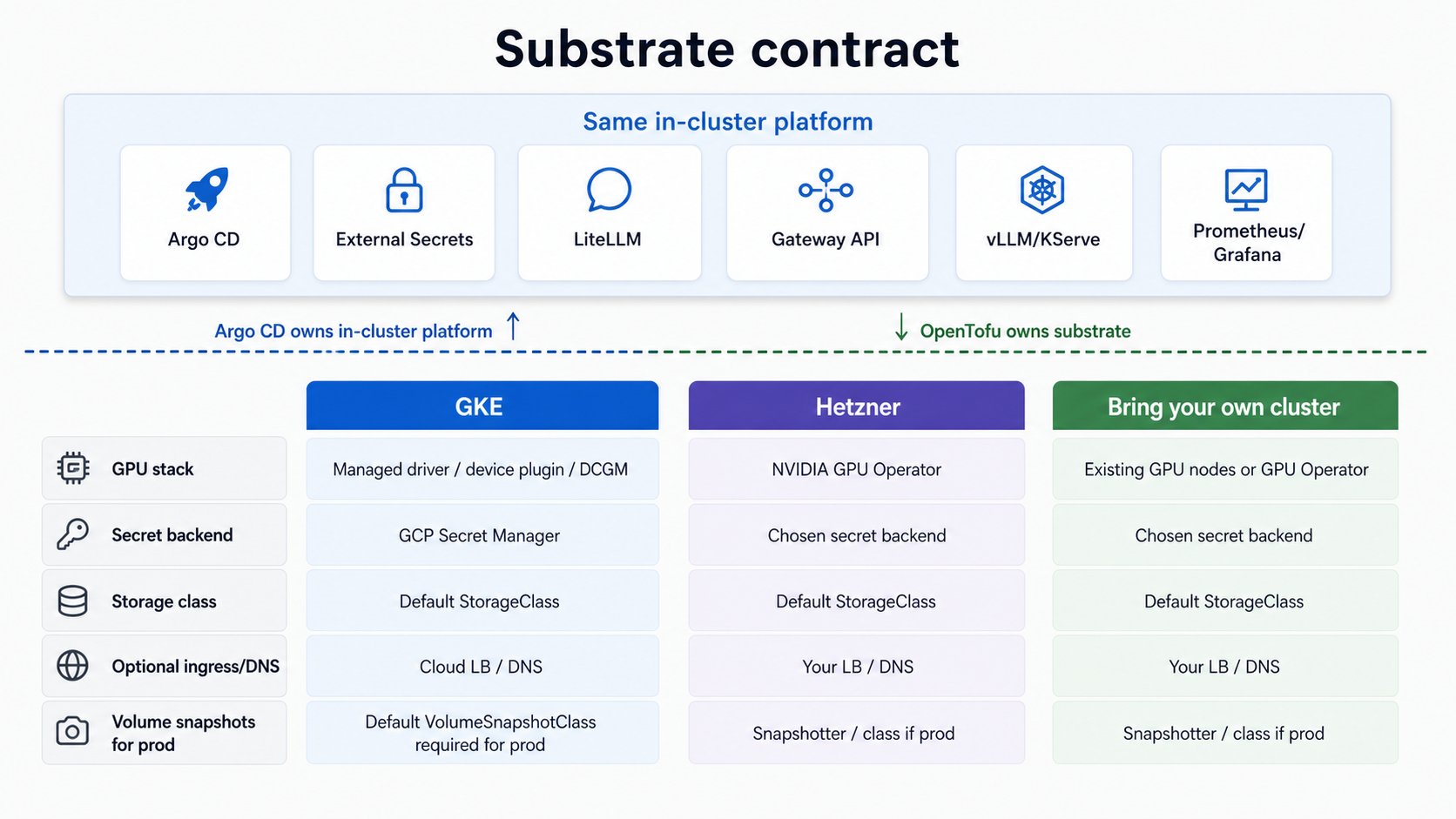
The serving, routing, and tenancy layers above this do not change. Provisioning differs; the
platform does not.
GKE
The OpenTofu root creates the cluster, a CPU pool, a scale-to-zero GPU pool, Workload Identity, node IAM, required APIs, and an Artifact Registry repo for model images.Prerequisites
Local tools: GNUmake, gcloud (authenticated, with the gke-gcloud-auth-plugin component so
kubectl can authenticate to GKE), tofu (OpenTofu), kubectl, helm v3, plus
git, curl, jq, openssl, perl, and python3 with pyyaml. macOS and Linux are both
supported (make fork-init uses perl, not sed -i, and the resolver scripts use only POSIX awk).
GCP:
- A GCP project with billing enabled.
- GPU quota in your region. The default GPU pool is L4 in
us-central1-a; you needNVIDIA_L4_GPUS(regional) ≥ 1,GPUS_ALL_REGIONS(global) ≥ 1, and regionalCPUsheadroom. Request increases before you start; approval can take hours. See the GPU debugging guide.
L4 is frequently stocked out inus-central1-a. The platform is GPU-type-agnostic; a T4 fallback is supported by changinggpu_node_pool_name,gpu_machine_type, andgpu_accelerator_typeininfra/gke/terraform/terraform.tfvars.
Enable bootstrap APIs
A blank project needs Service Usage and Resource Manager enabled first so OpenTofu can manage the rest:Create the cluster
make tf-apply prompts for interactive approval. For unattended/CI applies, set AUTO_APPROVE=1
to pass -auto-approve:
Seed secrets into the backend
tf-apply enabled the Secret Manager API (infra/gke/terraform/main.tf), so the backend is now
reachable. Seed the internal random secrets and create the external ones your config uses:
make seed-secrets writes to Google
Secret Manager via gcloud. For any other backend it prints the key list plus the
ESO provider docs link, and you create the values with
that backend’s own tooling (vault kv put, aws secretsmanager create-secret, kubectl). The
in-cluster contract is identical either way: every workload reads a Kubernetes Secret that ESO
materializes from the secret-store. See the Secrets reference for the list.
Verify the GPU pool is scale-to-zero
GKE installs the NVIDIA driver and device plugin; the pool runs 0 nodes until a GPU pod schedules, so it costs ~$0 by itself.0, max 1. Now continue to
Install the platform.
Prod profile: create a default VolumeSnapshotClass
Theprod profile schedules CNPG volume-snapshot backups, which need a default
VolumeSnapshotClass. GKE installs the PD CSI driver and the snapshot CRDs but ships no default
class, so create one before applying the prod profile. make doctor PROFILE=full fails until it
exists:
cost and dev profiles take no backups and need no snapshot class.
Hetzner
Hetzner is the platform’s portability proof: the same in-cluster stack on a second cloud, with
a self-managed GPU stack (NVIDIA GPU Operator) instead of GKE’s managed one. GKE is the reference
substrate; the self-managed GPU stack is validated on Hetzner. This section documents the path and
the substrate knobs it uses.
- GPU stack: set
gpu_stack: operatorinconfig.yamland the platform deploys the NVIDIA GPU Operator (driver, device plugin, DCGM, NFD) as a GitOps-managed app. This replaces what GKE’s node image provides for free, and is the single biggest difference from the GKE path. You still supply the node prerequisites (matching kernel headers; Secure Boot off on Ada GPUs). - Secret manager: point External Secrets Operator at your chosen backend instead of GCP Secret Manager + Workload Identity.
- Storage class: provide a default
StorageClassfor the model-cache volume. - DNS / ingress: only if you expose the endpoint publicly.
Bring your own cluster
If you already run a Kubernetes cluster with GPU nodes, skip provisioning entirely. Confirm it provides:- GPU nodes with
nvidia.com/gpuresources schedulable. Either bring your own driver + device plugin + DCGM, or setgpu_stack: operatorand let the platform deploy the NVIDIA GPU Operator (it expects matching kernel headers and Secure Boot off on Ada GPUs). - A default
StorageClassfor the model-cache PVC. - External Secrets Operator wired to a secret backend you control (or be ready to install it as part of the platform layer), so secrets sync keylessly rather than living in git.
- A kubeconfig for the cluster. This repo talks only to its own
./kubeconfig(gitignored), never your global current context; copy yours to./kubeconfigor pointCLUSTER_KUBECONFIGat it. The install stage validates and prints the target viamake require-kube.