

Fork the repo
Set your fork config
environments/<env>/config.yaml is the single source of fork config, the one place you set
non-secret, per-environment values. Secret values never live here; they come from your cloud’s
secret manager.
config.yaml is the single source for repoURL and projectID. Rather than templating, a script
rewrites every file that embeds them (the app-of-apps, all Argo Applications, the secret-store
config, scripts, READMEs):
make fork-init rewrites only git-tracked files (it uses git grep), so if you copied the repo
instead of gh repo fork, commit first (git add -A && git commit) or it exits with an error.
Never hand-edit the embedding files; edit config.yaml and re-run make fork-init. Editing only
config.yaml matters: make fork-init discovers the old value from a canonical anchor manifest, so if
you hand-edit the domain, repoURL, or projectID in some manifests but not others first, the tree is
inconsistent and make fork-init aborts with a message naming the disagreeing files. Run git checkout
on those files, then re-run. After make fork-init completes you are free to customize per-component
hostnames (for example a separate domain for grafana or chat); the guard only checks the pre-fork
template state and never enforces uniformity afterward.
Secrets and providers
Secret values never live in git. The platform splits them into two classes: internal randoms it can mint for you, and real external credentials only you can provide. For the full per-secret list, see the Secrets reference.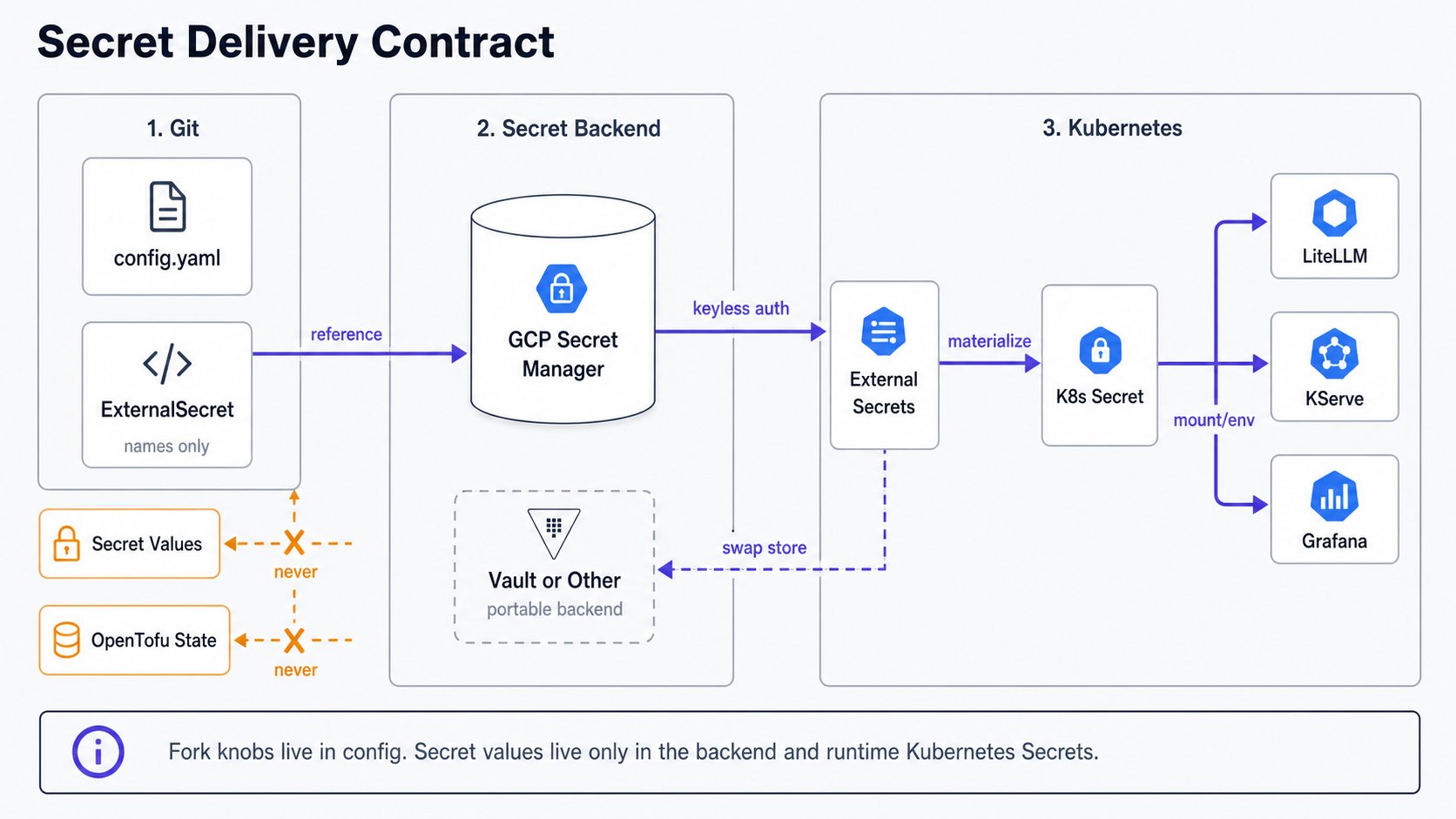
Secrets you provide vs auto-generated
This stage is where you decide the split; you seed the values later, in Provision, once the backend exists.make seed-secrets mints
every internal random secret (LiteLLM master/salt keys, the internal vLLM key, the oauth2-proxy
cookie secret, the Dex static-admin password/hash, the Dex OIDC client secrets, and the Postgres
passwords), create-if-absent and reusing existing values. You supply only the real external
credentials, and only the ones your configuration actually uses:
Seeding writes to your secret backend, so it is a substrate step, not a cloud-independent one. You
run
make seed-secrets in Provision, and make credentials
(operator logins) later in Install, after Argo CD is up. After
seeding, a typical fork has zero to three secrets left to hand-create. If an older fork has
dex-admin-hash but no dex-admin-password, run make reset-dex-admin once; bcrypt hashes are
one-way, so the original password cannot be recovered.
Secret backend (your choice)
The default backend is Google Secret Manager (secret_backend: gcpsm). To use AWS Secrets
Manager, Azure Key Vault, HashiCorp Vault, or Kubernetes Secrets, set secret_backend
to any non-gcpsm value and fill the store’s provider: block per the
ESO provider docs:
ExternalSecret references the store by name (secret-store), so swapping backends changes
only the store, not the workloads. For gcpsm, the store is rendered fully from config; for any
other backend, the resolver writes a placeholder once and never clobbers your hand-edited provider
block. One exception: the ESO Kubernetes provider needs a per-ExternalSecret property: field, so
those manifests do change (see Secrets).
GPU stack (your substrate)
gpu_stack selects who installs the NVIDIA driver, device plugin, and DCGM metrics exporter:
gke-managed(default): GKE’s node image provides the stack; DCGM metrics come from GKE’s manageddcgm-exporter. No operator is deployed.operator: for any non-GKE substrate (Hetzner, bare metal, Vast). The platform deploys the NVIDIA GPU Operator (driver + toolkit + device plugin + DCGM + node-feature-discovery) as a GitOps-managed app, and DCGM metrics come from the operator’s own exporter. You still supply the node prerequisites (matching kernel headers; Secure Boot off on Ada GPUs).none: CPU-only clusters; no GPU stack and no GPU metrics.
operator on GKE: the operator’s nvidia container runtime cannot register with GKE’s
containerd. make doctor warns on the mismatch. See provision infrastructure
for the off-GKE GPU path.
DNS provider (if dns.automate)
When dns.automate: true, set dns.provider (none, google, or cloudflare). cloudflare
requires the cloudflare-api-token external secret, a token scoped Zone:DNS:Edit minted per the
Cloudflare API token docs;
google is keyless on GKE via Workload Identity; none means you create A records by hand. See the
external-dns docs. On the cloudflare path,
cert-manager issues wildcard certificates with an ACME DNS-01 solver using the same token; see the
cert-manager DNS-01 docs.
SSO / Dex
Theidentity feature ships Dex with a static demo user for first-boot access. To wire a real
identity provider (Google, GitHub, generic OIDC, LDAP), add a
Dex connector. The OIDC client secrets Dex needs
(dex-*-client-secret) and static-admin bootstrap keys are auto-seeded by make seed-secrets, so you
only configure the connector.
Choose how much platform to deploy
Two independent dials control what gets installed.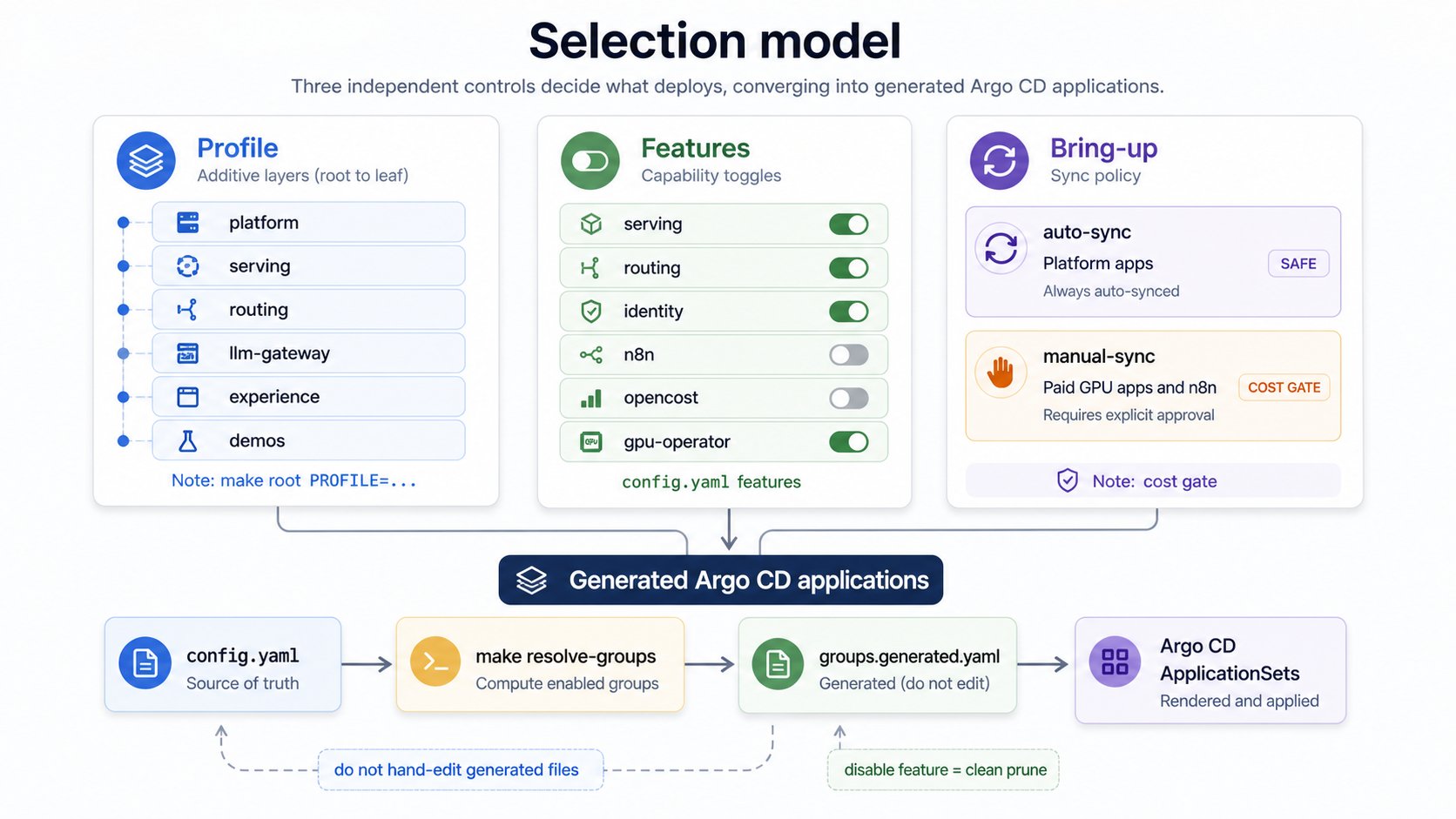
make root PROFILE=…. Each is a superset of the
one before: you widen, you don’t switch:
Feature flags (PROFILEis notprofile:. ThemakevariablePROFILEselects deploy layers (this table). The separateprofile:key inconfig.yamlselects the economic HA tier (cost/dev/prod), covered in Production HA. Two dials, similar names.
config.yaml features:) toggle individual capability groups within a layer,
e.g. run your own DNS instead of the bundled one. After editing flags, regenerate the resolved set: