> ## Documentation Index
> Fetch the complete documentation index at: https://ai.wmx.dev/llms.txt
> Use this file to discover all available pages before exploring further.
# n8n automation
n8n is an optional automation surface. Enabling it creates an Argo CD Application; it does not sync
until an operator chooses to bring it up.
 ## Enable
1. Set `features.n8n: true` in `environments/ai-dev/config.yaml`.
2. Run `make resolve-groups`.
3. Run `make seed-secrets` so `n8n-encryption-key` exists in the secret backend.
4. Apply a profile that includes `identity`, `public-edge`, `llm-gateway`, and `n8n`, then manually
sync the `n8n` Application in Argo CD.
The n8n app uses standalone mode: SQLite on the `n8n` PVC. Queue mode needs external Postgres and Redis
and is intentionally not part of the lab deployment.
## Access
When the public edge is enabled, n8n is exposed at:
```text theme={"theme":{"light":"github-light","dark":"github-dark"}}
https://n8n.
```
`make fork-init` rewrites the domain for forks.
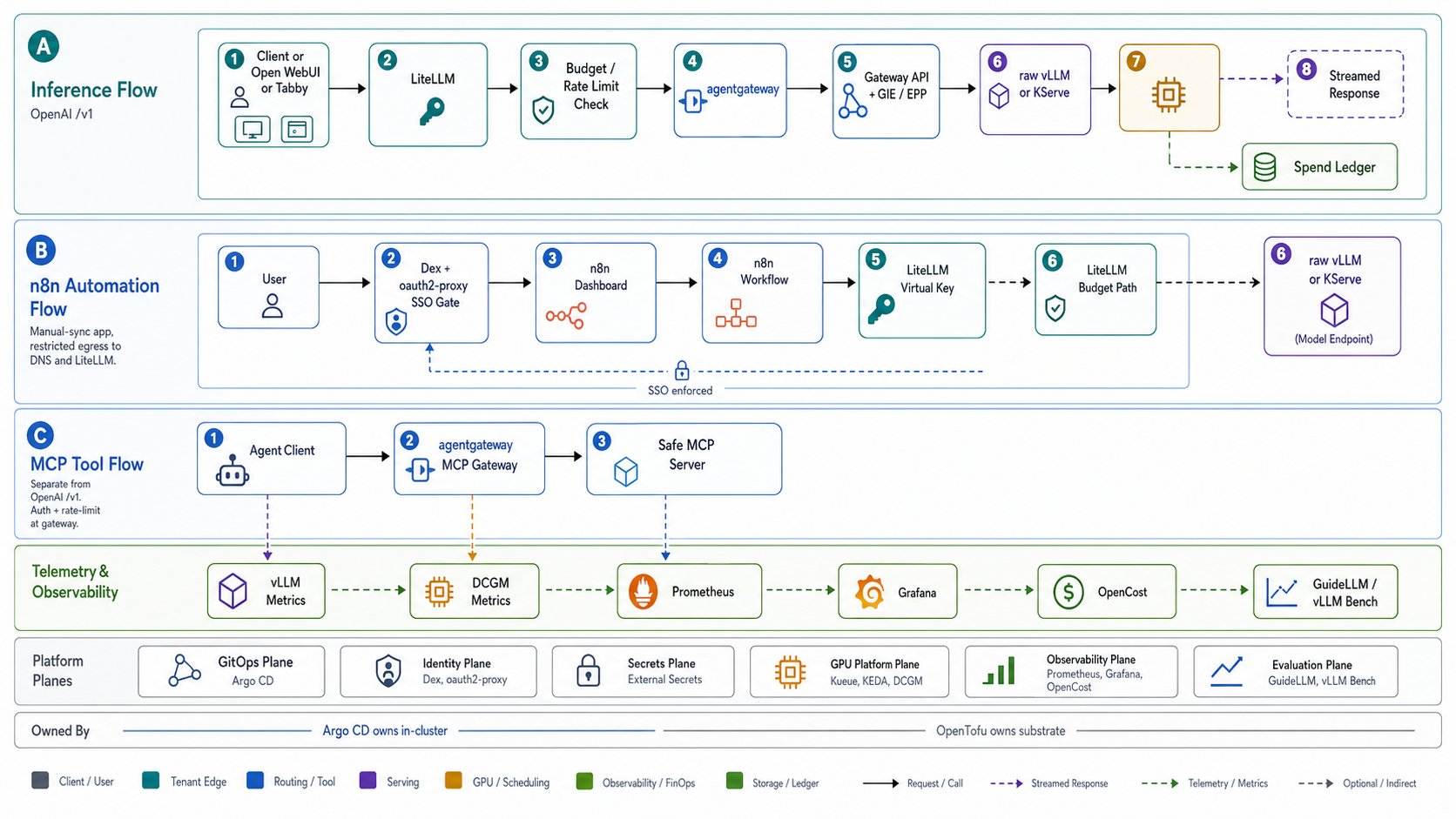
n8n authenticates in two layers. The dashboard route is fail-closed behind Dex through oauth2-proxy
before n8n serves any page, so only a Dex-authenticated identity reaches n8n. That edge gate is the
access boundary. Underneath it, the Community edition keeps its own owner login: n8n native single
sign-on (SAML or OIDC) is a Business and Enterprise feature, and n8n removed the
`N8N_USER_MANAGEMENT_DISABLED` variable in version 1.0, so the built-in login cannot be turned off on
the OSS edition. The owner account is a second, instance-local credential behind the edge SSO gate.
To skip the interactive owner-account setup screen, pre-provision the instance owner from the
environment (n8n v2.17.0 and later): set `N8N_INSTANCE_OWNER_MANAGED_BY_ENV=true` with
`N8N_INSTANCE_OWNER_EMAIL` and a bcrypt `N8N_INSTANCE_OWNER_PASSWORD_HASH` (a plaintext password breaks
login). Flow the hash through the secret backend and ESO the same way as `dex-admin-hash` so the owner
stays GitOps-managed with no manual setup step.
## Secrets
`make seed-secrets` creates:
```text theme={"theme":{"light":"github-light","dark":"github-dark"}}
n8n-encryption-key
```
ESO projects it into `n8n/n8n-core-secrets` as `N8N_ENCRYPTION_KEY`. The same Secret also carries the
non-secret host, port, and protocol values because the official chart expects all core settings in one
Secret.
The in-cluster `n8n-key-minter` Job creates `n8n/n8n-litellm-secrets` with a LiteLLM virtual key. That
key is exposed to the pod as `OPENAI_API_KEY`; `OPENAI_API_BASE_URL` points at the in-cluster LiteLLM
`/v1` endpoint.
## Network posture
The n8n main pod is restricted to:
* ingress from the shared agentgateway data plane
* egress to cluster DNS
* egress to LiteLLM on port `4000`
This keeps AI calls on the LiteLLM budget path. Add explicit NetworkPolicy before enabling workflows
that call other internal or external services.
## SSO check
Unauthenticated dashboard access should redirect to Dex:
```sh theme={"theme":{"light":"github-light","dark":"github-dark"}}
curl -I https://n8n.
```
Expected: an HTTP redirect to `portal./oauth2/start` or the Dex login flow. A direct
HTTP 200 from n8n is a failed SSO gate.
## Enable
1. Set `features.n8n: true` in `environments/ai-dev/config.yaml`.
2. Run `make resolve-groups`.
3. Run `make seed-secrets` so `n8n-encryption-key` exists in the secret backend.
4. Apply a profile that includes `identity`, `public-edge`, `llm-gateway`, and `n8n`, then manually
sync the `n8n` Application in Argo CD.
The n8n app uses standalone mode: SQLite on the `n8n` PVC. Queue mode needs external Postgres and Redis
and is intentionally not part of the lab deployment.
## Access
When the public edge is enabled, n8n is exposed at:
```text theme={"theme":{"light":"github-light","dark":"github-dark"}}
https://n8n.
```
`make fork-init` rewrites the domain for forks.
n8n authenticates in two layers. The dashboard route is fail-closed behind Dex through oauth2-proxy
before n8n serves any page, so only a Dex-authenticated identity reaches n8n. That edge gate is the
access boundary. Underneath it, the Community edition keeps its own owner login: n8n native single
sign-on (SAML or OIDC) is a Business and Enterprise feature, and n8n removed the
`N8N_USER_MANAGEMENT_DISABLED` variable in version 1.0, so the built-in login cannot be turned off on
the OSS edition. The owner account is a second, instance-local credential behind the edge SSO gate.
To skip the interactive owner-account setup screen, pre-provision the instance owner from the
environment (n8n v2.17.0 and later): set `N8N_INSTANCE_OWNER_MANAGED_BY_ENV=true` with
`N8N_INSTANCE_OWNER_EMAIL` and a bcrypt `N8N_INSTANCE_OWNER_PASSWORD_HASH` (a plaintext password breaks
login). Flow the hash through the secret backend and ESO the same way as `dex-admin-hash` so the owner
stays GitOps-managed with no manual setup step.
## Secrets
`make seed-secrets` creates:
```text theme={"theme":{"light":"github-light","dark":"github-dark"}}
n8n-encryption-key
```
ESO projects it into `n8n/n8n-core-secrets` as `N8N_ENCRYPTION_KEY`. The same Secret also carries the
non-secret host, port, and protocol values because the official chart expects all core settings in one
Secret.
The in-cluster `n8n-key-minter` Job creates `n8n/n8n-litellm-secrets` with a LiteLLM virtual key. That
key is exposed to the pod as `OPENAI_API_KEY`; `OPENAI_API_BASE_URL` points at the in-cluster LiteLLM
`/v1` endpoint.
## Network posture
The n8n main pod is restricted to:
* ingress from the shared agentgateway data plane
* egress to cluster DNS
* egress to LiteLLM on port `4000`
This keeps AI calls on the LiteLLM budget path. Add explicit NetworkPolicy before enabling workflows
that call other internal or external services.
## SSO check
Unauthenticated dashboard access should redirect to Dex:
```sh theme={"theme":{"light":"github-light","dark":"github-dark"}}
curl -I https://n8n.
```
Expected: an HTTP redirect to `portal./oauth2/start` or the Dex login flow. A direct
HTTP 200 from n8n is a failed SSO gate.